Enterprise IT Service Management Platform
One platform replaced phone calls, paper forms, and spreadsheets for about 300 staff across 12 offices.
The help desk, asset register, maintenance shop, and IT room wallboard for an electric cooperative, built from scratch to replace phone calls, walk-ins, paper forms, and spreadsheets.
- About 300 employees across 12 offices
- 20 modules across service desk, assets and maintenance, and platform
- Load-tested at 300 simultaneous requests with no duplicate ticket or form numbers
- Scale-tested with 100,000 closed tickets in the table
- 1,200+ commits, 38 hand-written SQL migrations, 430+ test files
- 450+ visual baselines in light and dark
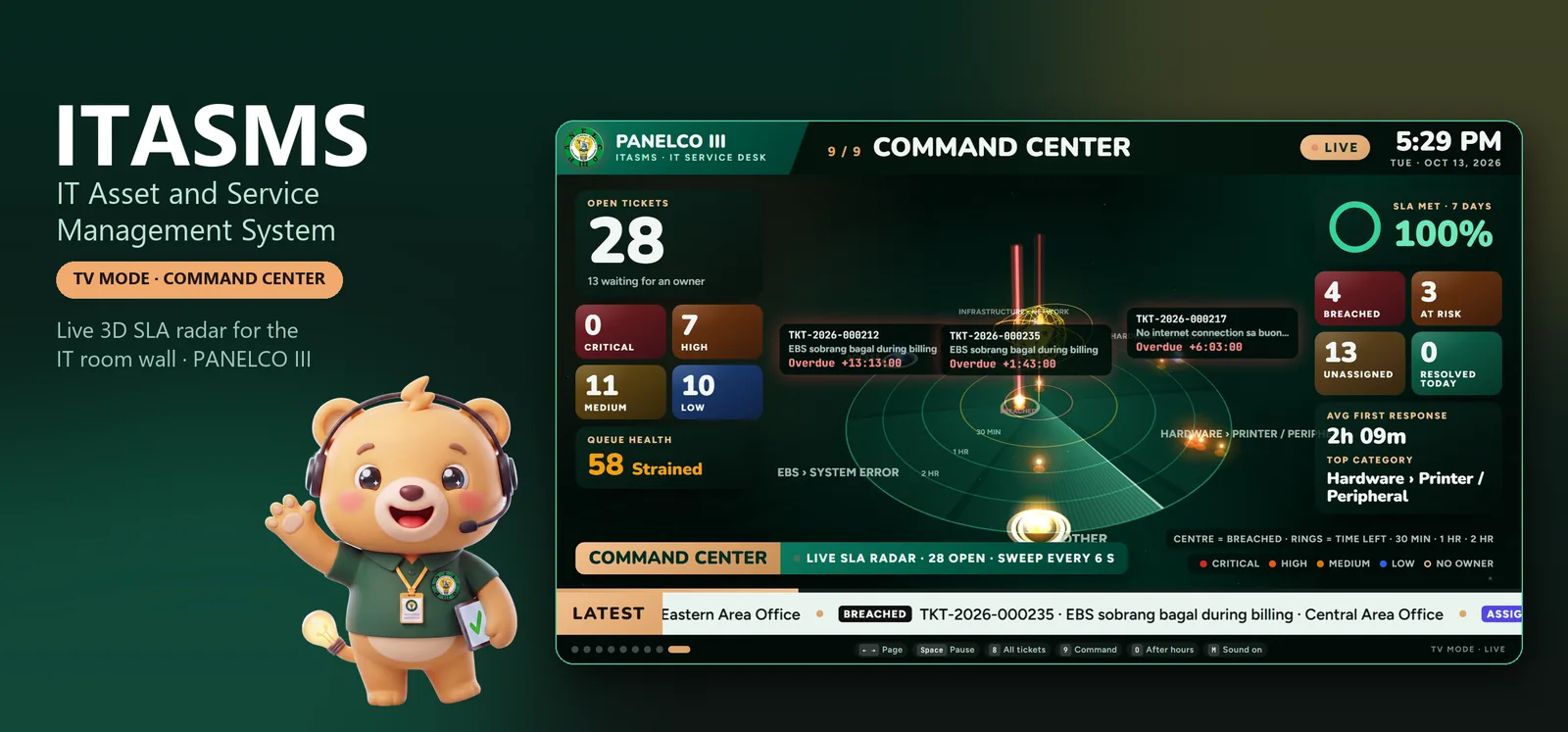
Load-tested at 300 simultaneous requests; a 15,000-ticket report returns in under 500 ms (p95)
Team of one· Solo architect & full-stack engineer
No team, no agency, no hand-offs. I owned this project end to end:
- Requirements
- Architecture
- UI & UX
- Backend & APIs
- Database
- Stack
- React 19Node.jsMS SQL ServerSocket.IOPlaywright
Where AI does the work: Automation runs the clock: the SLA engine warns, flags breaches, and escalates on its own, and the help center suggests a fix before a ticket is filed.
What was broken, and what fixed it
Screens show demo data; client data stays private.
Problem: IT requests came by phone, walk-in, and paper, and they got lost.
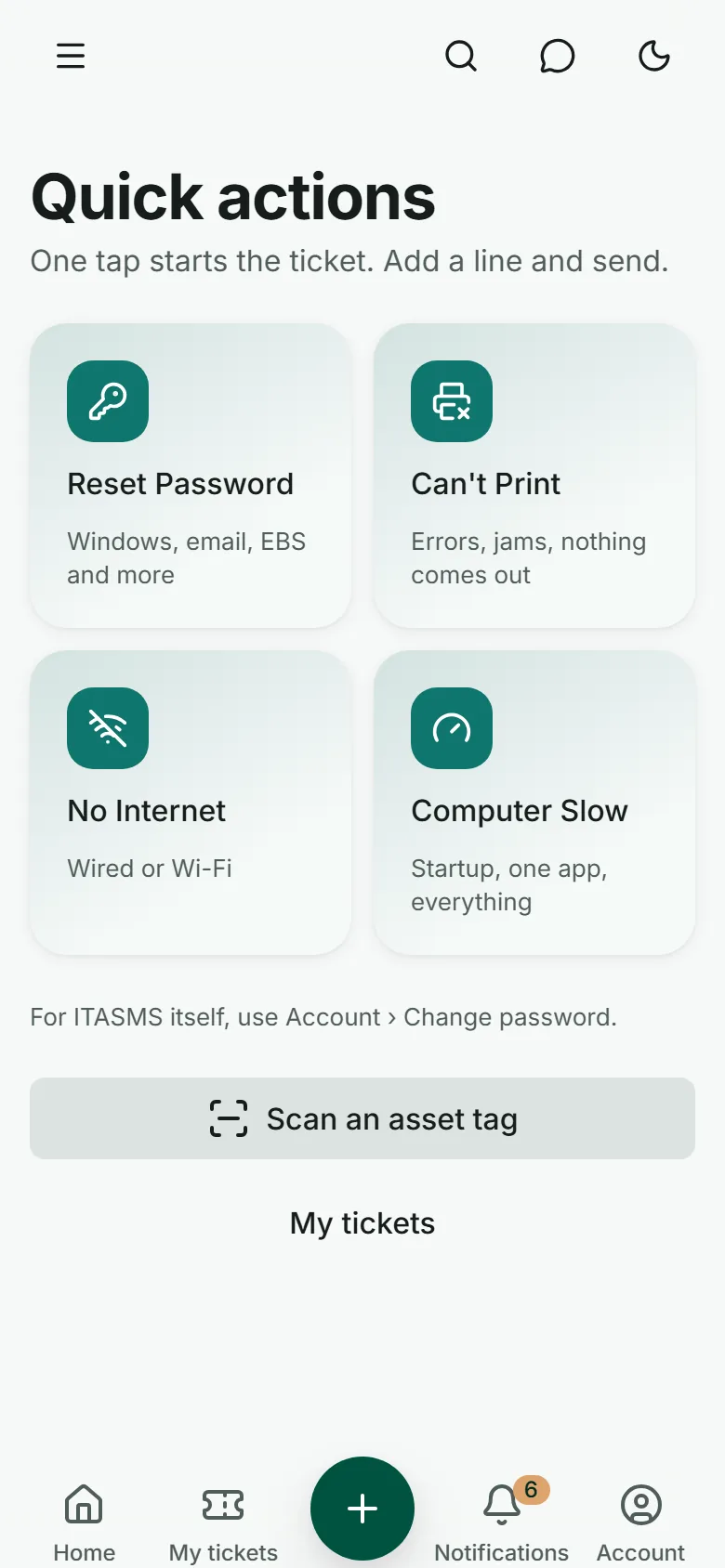
Fix: Every request becomes a numbered ticket in one help desk, with a queue, a kanban board, and per-ticket chat. Employees file from their phone with one tap, or by scanning the QR sticker on a broken device.
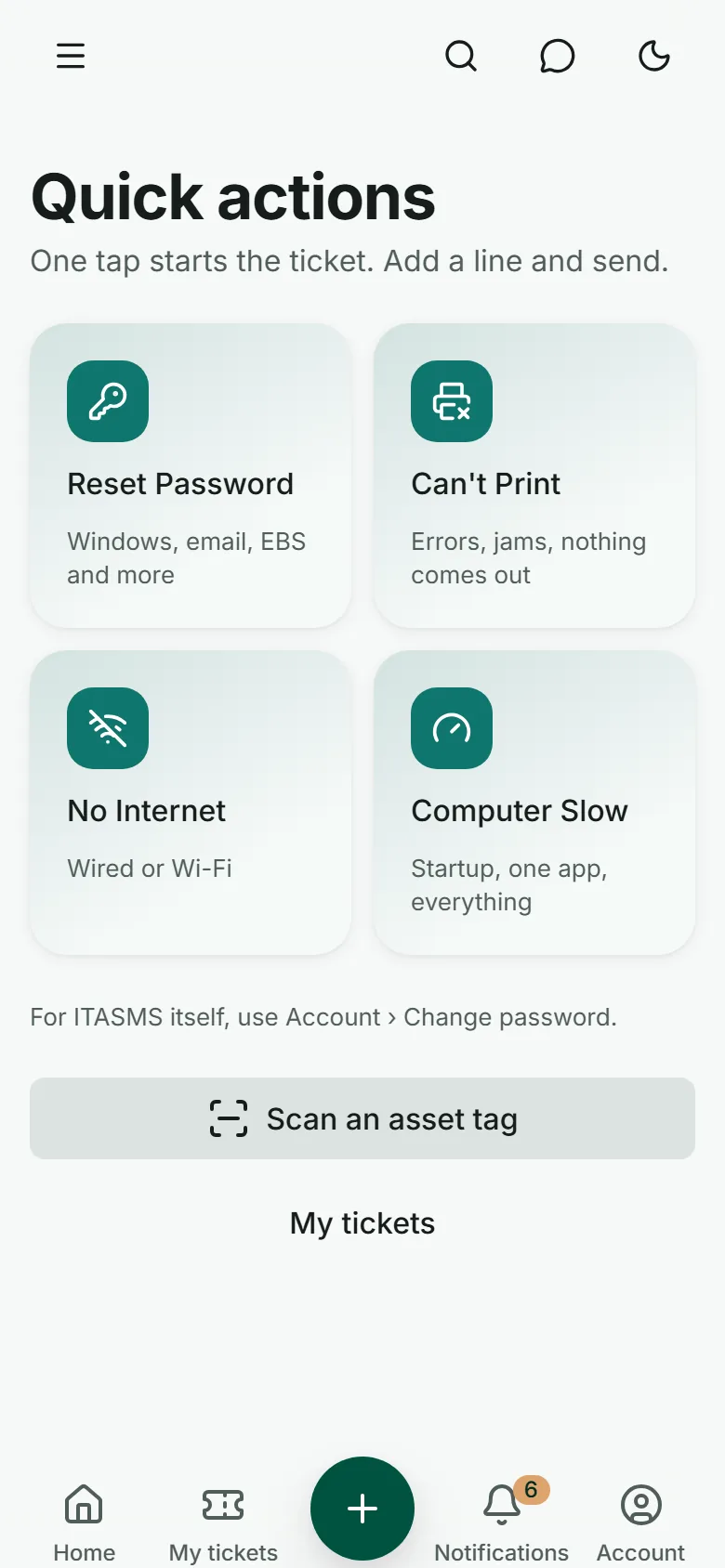
Employee mobile app: one-tap tickets for the most common problems, plus asset tag scanning. Problem: Once a ticket was filed, nothing kept time on it.
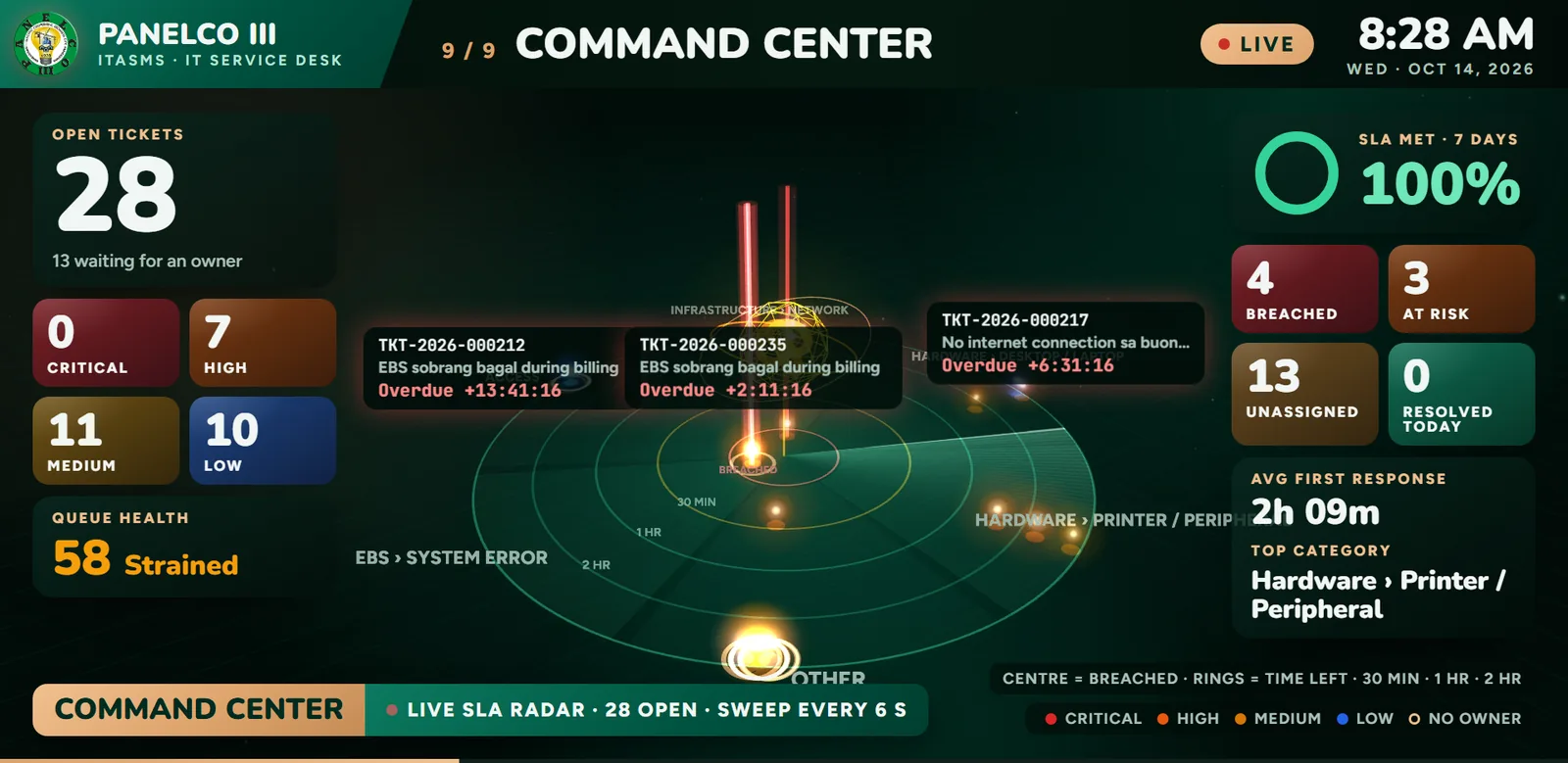
Fix: A business-hours SLA engine warns at 75%, flags a breach at 100%, and escalates critical and high breaches after 60 business minutes. The IT room TV plots every open ticket on a live 3D SLA radar.
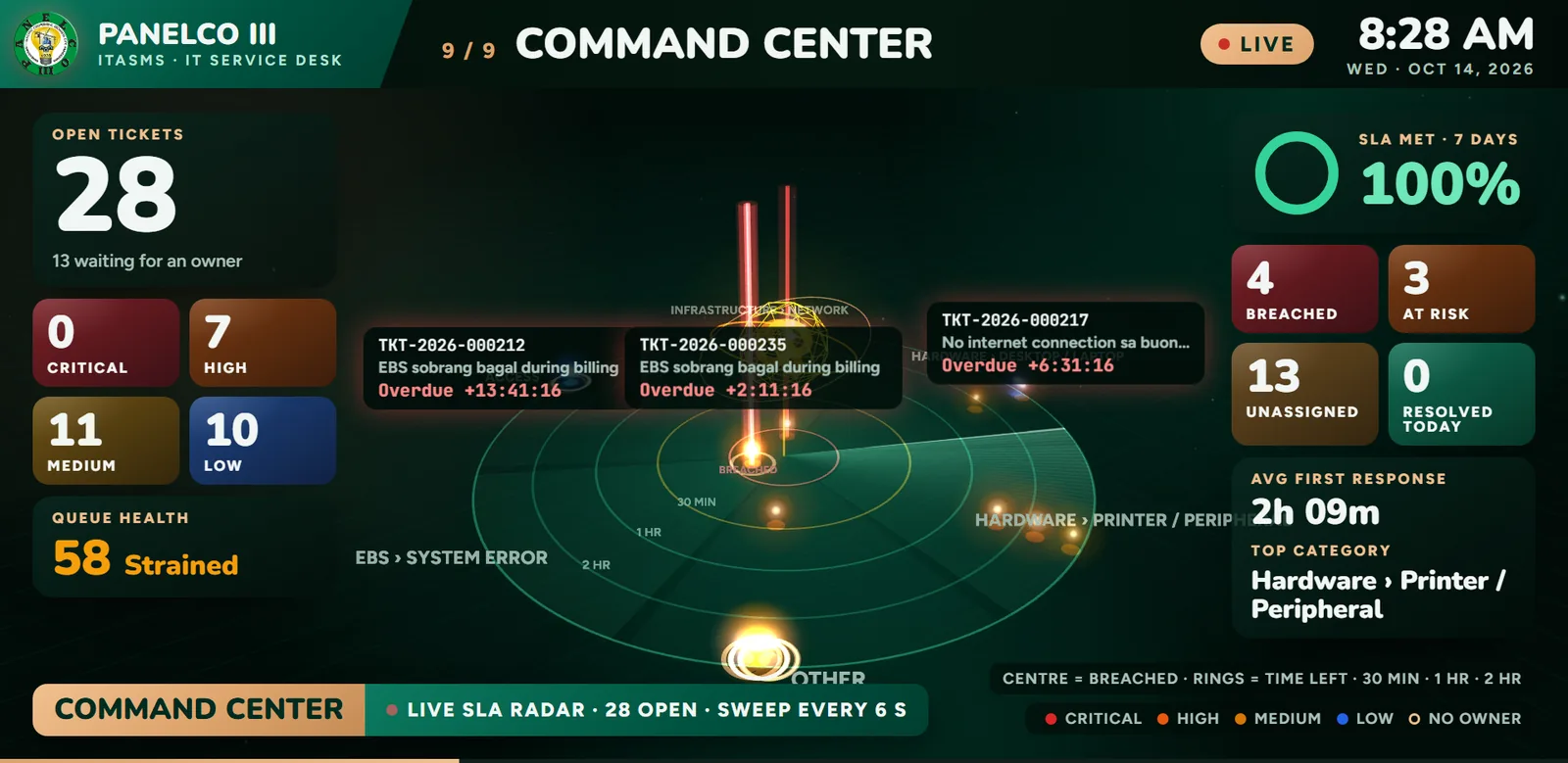
Command center: a live 3D SLA radar plotting every open ticket by time left, with breach and risk counts. 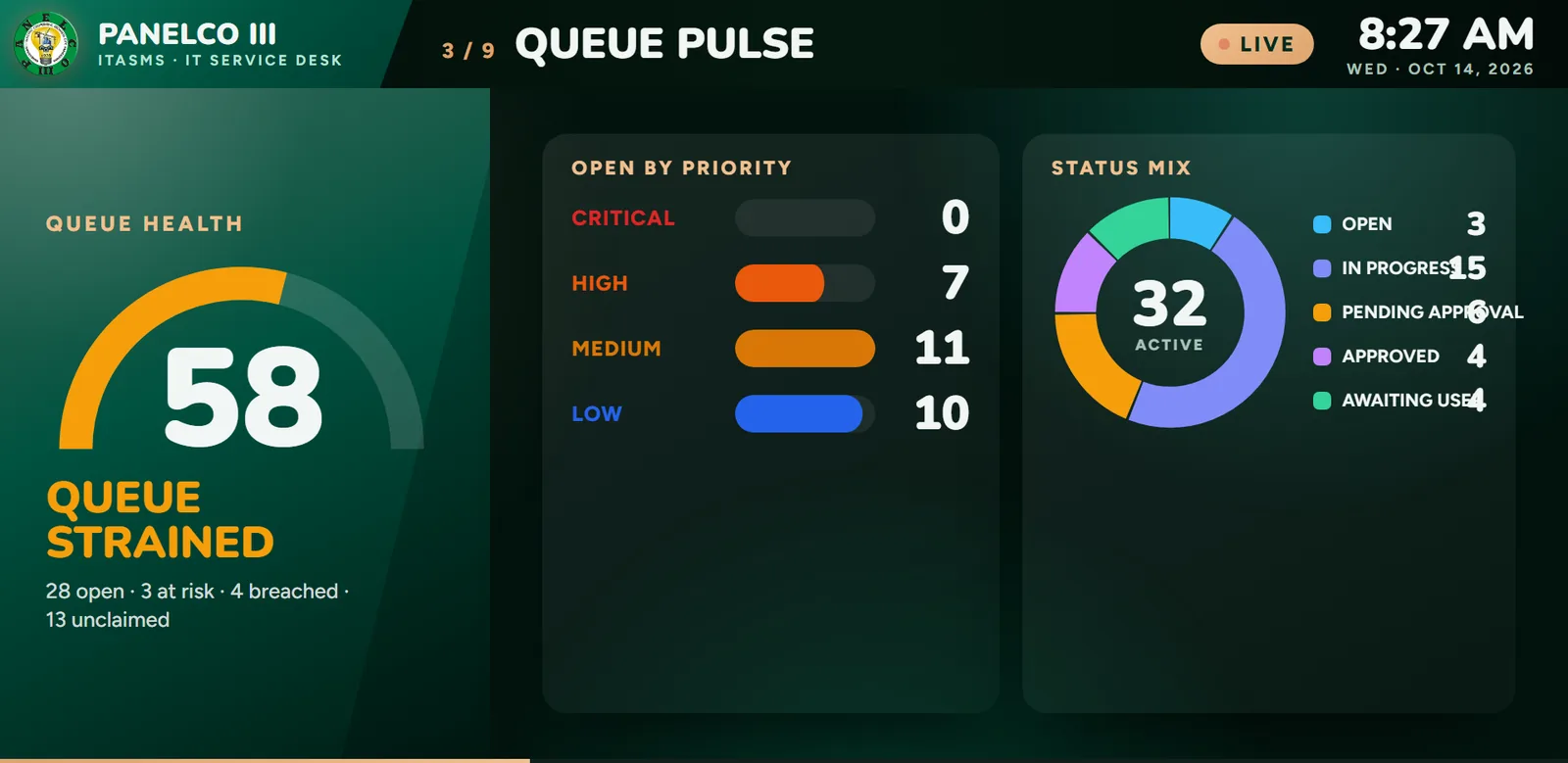
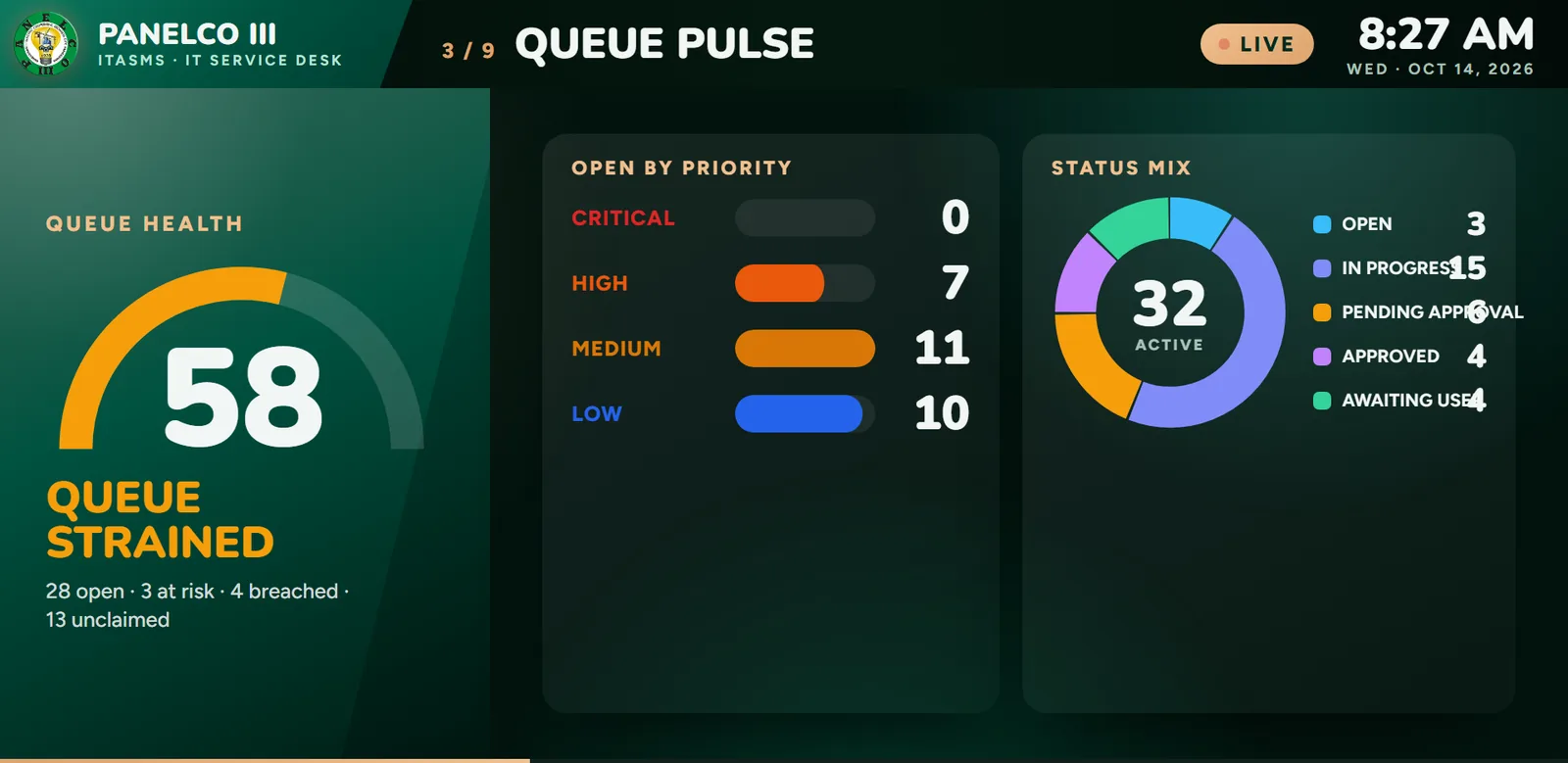
Queue pulse: queue health score, open tickets by priority, and status mix. Problem: Nobody could say for sure who held which computer.
Fix: A QR asset register records custodian, status, location, and condition, with signed custody receipts that print like the official paper forms. A daily digest flags desk workers missing a computer, monitor, or UPS.
The IT help desk, asset register, and TV command center for the IT room. Problem: The paper approval chain (supervisor, department manager, general manager) left no trail.
Fix: Approvals run through a 3-level change chain with one-click email endorsement, HMAC-verified digital signatures, and a full audit log.
Problem: The IT room could not see at a glance which problems were spiking or whether the team was keeping up.
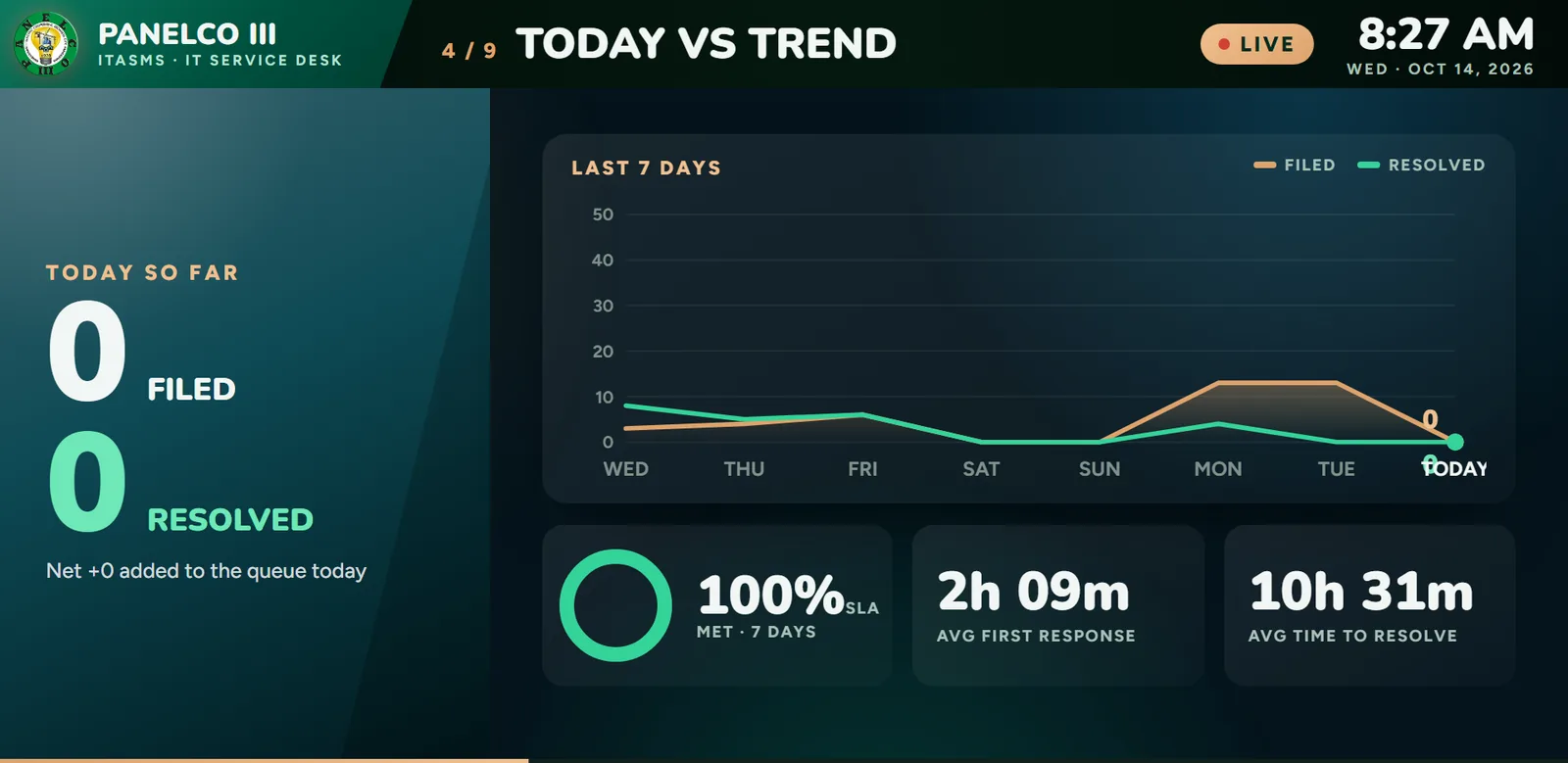
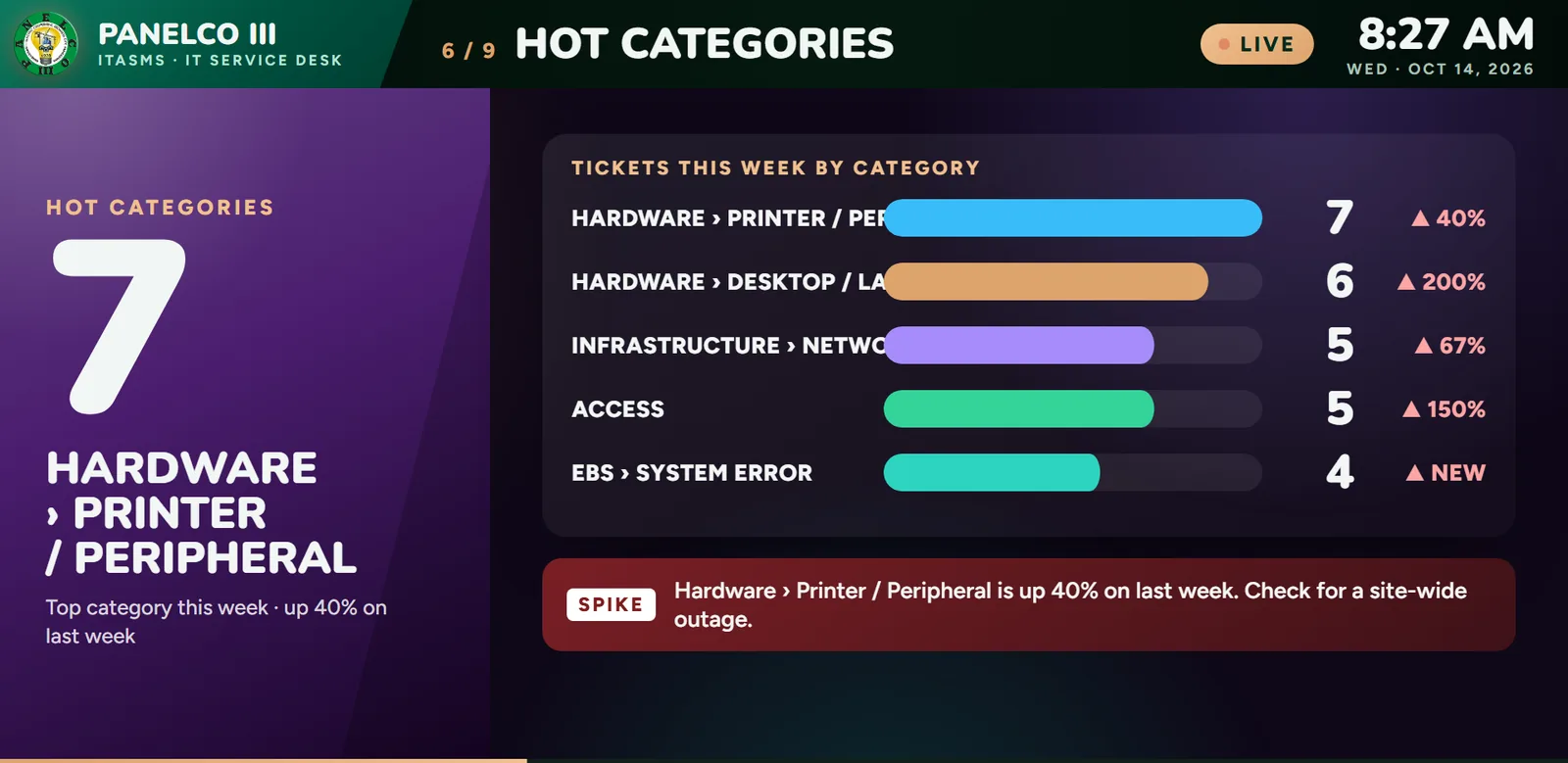
Fix: A 9-page TV wallboard rotates through queue health, today against the 7-day trend, team load, and hot categories, built to be read from 3 to 5 metres.
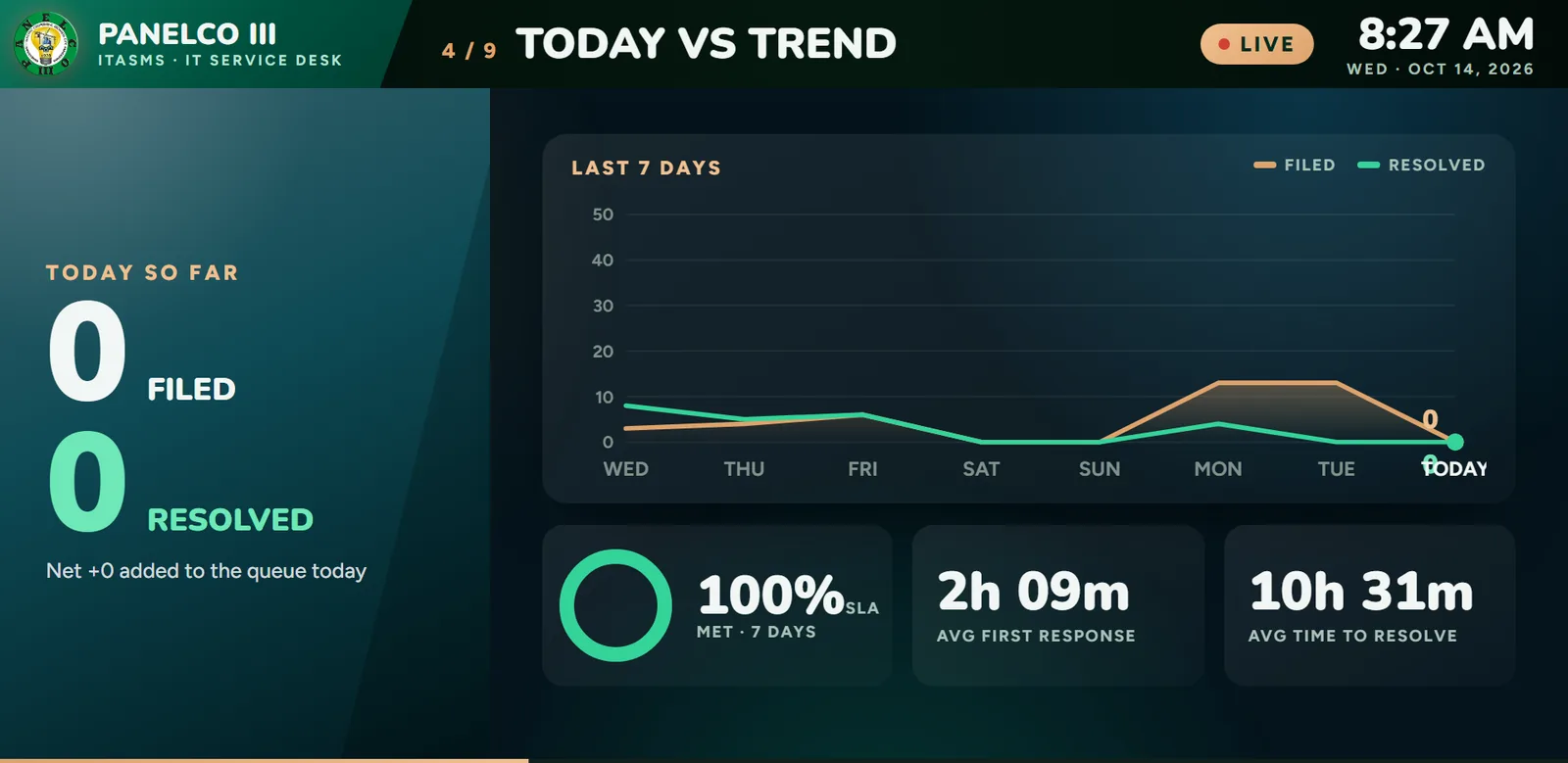
Today vs trend: tickets filed and resolved over 7 days, SLA met, and response and resolution times. 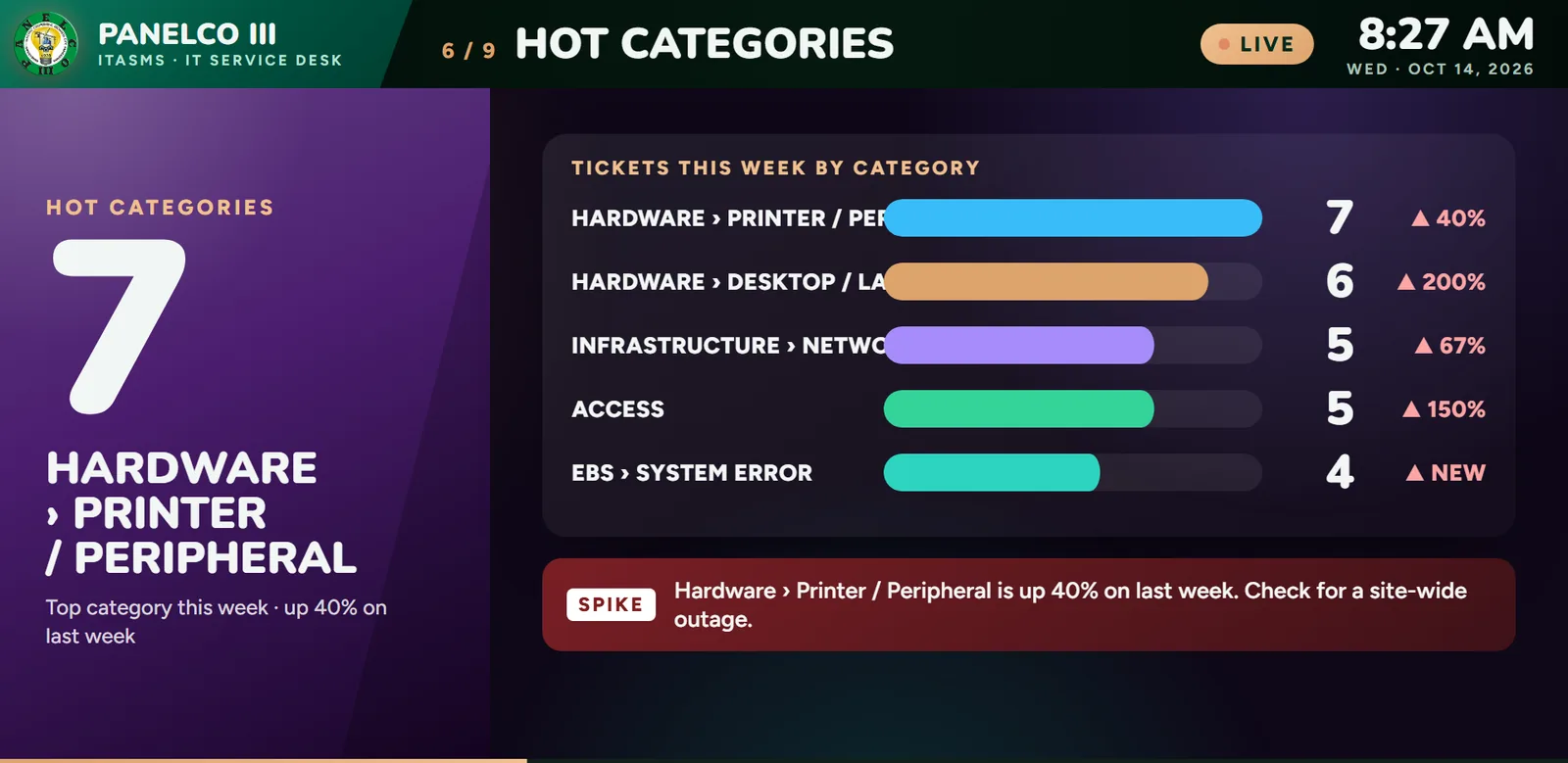
Hot categories: which problem types are spiking this week, flagged before they become an outage.

Approach
- Crash-safe by design: each write is one short SQL transaction, and emails and notifications go into an outbox in the same transaction, so a crash never loses or duplicates one.
- Every create carries an idempotency key, so a retry after a timeout replays the stored answer instead of filing a second ticket.
- One server with no Redis or message broker; reports run in their own worker so they never slow the help desk.
- Build what gets used: enterprise features that would sit empty for a 300-person cooperative were deliberately left out.
What it does
Help desk
- Crash-safe ticket filing with 8 statuses and year-based ticket numbers from a SQL sequence
- Category tree and claim rules by priority
- Queue with saved filters and bulk actions, plus a kanban board ordered by SLA risk
- Per-ticket chat with replies, reactions, attachments, unsend, and drafts
- Employees confirm or reject the fix; reminder after 2 days, auto-close after 5
- File a ticket by scanning the QR sticker on a broken device
SLA engine
- Business clock from 8am to 5pm on working days, holiday aware
- Pauses while a ticket waits for approval
- Targets by priority, from 1 hour response and 4 hour resolution for critical to 24 hours and 5 days for low
- Warning at 75%, breach at 100%, escalation 60 business minutes after a critical or high breach
- The SLA worker reads only due rows under a 5-minute lease, never the whole ticket table
Approvals
- One-click email endorsement
- 3-level change approval chain
- System modification and system access request forms
Assets and custody
- Asset register with QR tags, custodian, status, location, and condition
- Memorandum of Receipt, return and transfer slips, and an annual custody register
- Compliance rule: every desk worker holds a computer, monitor, and UPS, with a daily exceptions digest
- Import Center with three Excel templates that round-trip as exports
- My Assets view for employees, with warranty status
Maintenance
- Request for Repair from any held device, work orders, and technician slots
- Semi-annual preventive maintenance trips with a checklist and compliance report
- KPIs: MTTR, MTBF, first-time fix, preventive vs reactive, downtime
Knowledge and engagement
- "Ask Aytie" help search that suggests articles while an employee is still typing the ticket
- Known issues board with "I'm affected too" and deflection counts
- Quarterly pulse survey with NPS and a CSAT report
- Monthly IT hero badges for top rated, on time, and most thanked technicians
Reports and insights
- 12 reports in PDF, Excel, CSV, and Word
- Cron schedules on Manila time, templates, and history
- Signed sign-off page on every major report
- IT operations dashboard with 10+ widgets and an arrival heatmap
- 9 printed forms where every field maps to a database column
TV command center
- 9 rotating 1080p pages built to be read from 3 to 5 metres
- Urgent now, Unclaimed, Queue pulse, Today vs trend, Team load, Hot categories, Maintenance, All open tickets
- Command Center: a live 3D SLA radar where breached tickets rise as red beams
- New critical tickets and breaches interrupt with a full-screen bulletin and a chime
- Off-hours mode after 5pm shows critical tickets only; wall TVs pair once with a revocable link
Mobile
- Installable PWA with a bottom tab bar and bottom sheets
- One-tap quick actions and a QR asset scanner
- Technicians work the queue from the phone
- Every screen tested at 375 px in light and dark
Security and admin
- 8 roles on one resource.action.scope permission map, checked for drift at startup
- Self-registration with an emailed code, lockout, and rate limits
- In-app notifications over Socket.IO with quiet hours and digest mode
- Full audit log and HMAC-verified digital signatures with tamper alerts
Architecture
Interface
- React 19
- PWA
- Tailwind
- Vite
Logic & APIs
- Node.js
- Socket.IO
- Playwright
- TypeScript
- Express
Data
- MS SQL Server
Infrastructure & delivery
- Server
- 1PWATypeScriptExpress
Desktop browsers, the phone PWA, and the IT room TV call one Node, TypeScript, and Express API over HTTPS with JWT.
- 2SQL Server
Each write commits the row, the outbox entry, and the notice in one SQL Server transaction.
- 3Email
Background workers handle SLA ticks, the email outbox, reports, and preventive maintenance, each reading leased due rows.
- 4Realtime
Socket.IO events carry ids only; clients refetch over REST, so a dropped connection never leaves stale data on screen.
- 5ReactTailwindViteServer
React 19, Vite, TanStack Query and Table, and Tailwind v4 on the front end; one server under PM2 with nightly retention jobs.
Engineering
- A kill -9 crash test fires a burst, kills the process, restarts it, and verifies nothing was lost or duplicated.
- Load-tested at 300 simultaneous requests across tickets, queue, custody, maintenance, reports, and surveys.
- A 15,000-ticket report runs in a background worker; in load tests the help desk stays under 500 ms (p95) while three reports generate.
- Query plans are pinned by tests: the report scan must be an index seek or the build fails.
- 15-minute access tokens with 7-day rotated refresh tokens in an HttpOnly cookie, tokens hashed at rest, a CSV formula-injection guard, and a separate read-only login for custom queries.
- Test-driven with Jest against a real SQL Server test database, Vitest and Playwright on the front end, and a quality gate (types, tests, every load test) that must pass before anything merges.
Outcome
- Load-tested at 300 simultaneous requests with no duplicate ticket numbers.
- A 15,000-ticket report returns in under 500 ms (p95) in testing, while the help desk keeps running.